SoundTouch Service
The soundtouch-service is a comprehensive local server that emulates Bose’s cloud services, enabling offline SoundTouch device operation and advanced debugging capabilities. This service is particularly valuable given Bose’s announcement that cloud support will end in May 2026.
Overview
The service provides:
- 🏠 Local Service Emulation: Complete BMX (Bose Media eXchange) and Marge service implementation
- 🔧 Device Migration: Migrate devices from Bose cloud to local services via XML redirect or DNS/DHCP redirect
- 🔍 DNS Discovery & Interception: Built-in DNS server to discover unknown Bose endpoints and selectively intercept cloud traffic
- 📊 Traffic Proxying: Inspect and log all device communications for debugging
- 🌐 Web Management UI: Browser-based interface for device management
- 💾 Persistent Data: Store device configurations, presets, and usage statistics
- 📝 HTTP Recording: Persist all interactions as re-playable
.httpfiles - 📥 Session Archiving: Download entire interaction sessions as
.tar.gzfor offline analysis - 🔍 Auto-Discovery: Automatically detect and configure SoundTouch devices
- 🔒 Offline Operation: Continue using full device functionality without internet
- 🔗 Bose Proxy & Soundcork Fallback: Dynamic proxying with automatic fallback to local SoundCork emulation if enabled
Architecture
The service consists of several key components:
BMX Services (Bose Media eXchange)
- TuneIn Integration: Direct playback of radio stations and podcasts
- RadioBrowser Integration: Open community radio directory alongside TuneIn
- Custom Streams: Flexible playback of any internet radio URL via dynamic proxy
- Service Registry: Media service discovery and configuration
- Playback Control: Stream URL resolution and audio metadata
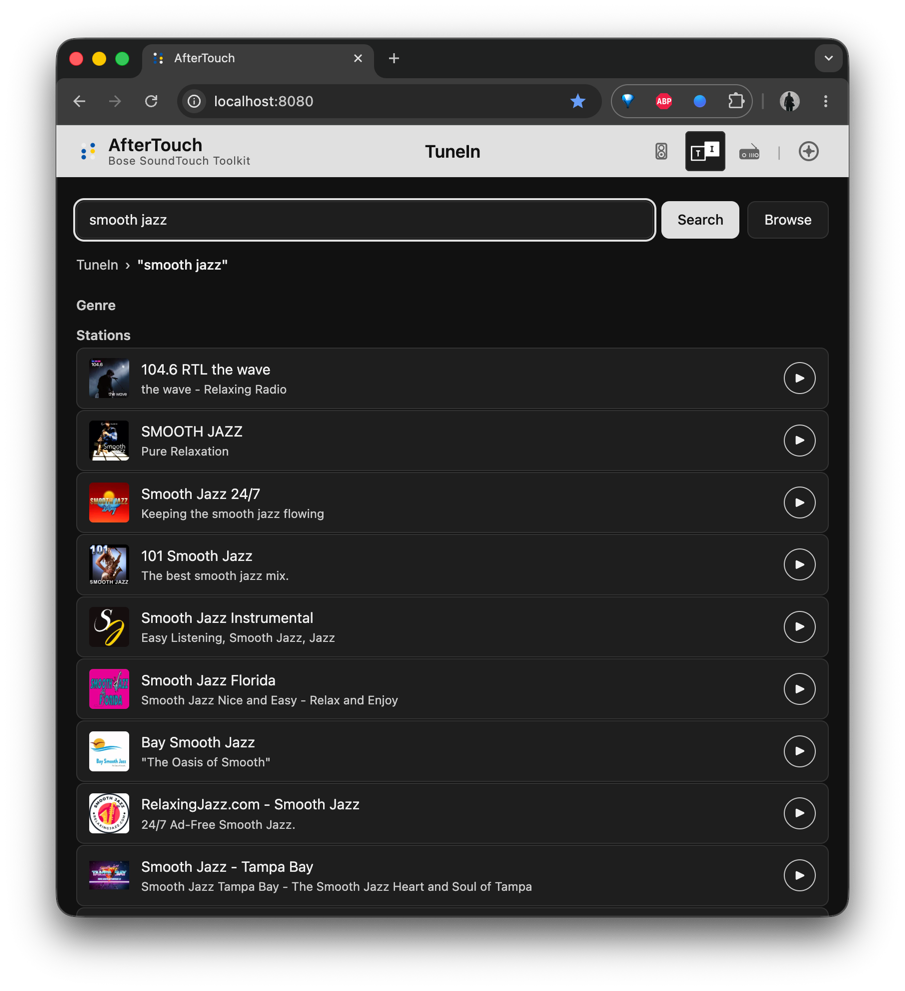
Marge Services (Account & Device Management)
- Account Management: User account simulation and device association
- Preset Synchronization: Cross-device preset storage and sync
- Recent Items: Playback history tracking and management
- Configuration Management: Device settings and preferences
Discovery & Migration
- Network Scanning: UPnP/SSDP and mDNS device discovery
- Device Analysis: Configuration assessment and compatibility checking
- Service Migration: Automated configuration updates for local service usage
- Health Monitoring: Device connectivity and service status tracking
Installation
Install from Source
go install github.com/gesellix/bose-soundtouch/cmd/soundtouch-service@latestBuild from Repository
git clone https://github.com/gesellix/bose-soundtouch.git
cd Bose-SoundTouch
go build -o soundtouch-service ./cmd/soundtouch-service
Docker Support
You can run the SoundTouch service using Docker or Docker Compose.
Note for macOS and Windows users: The
--net hostoption is only supported on Linux. On macOS and Windows, service discovery (mDNS, UPnP) will not work automatically within the container. You will need to manually enter your device’s IP address in the management UI, and the service will communicate with it directly.
Using Docker
Linux (with host networking for discovery):
docker run -d \
  --name soundtouch-service \
  --network host \
  -v $(pwd)/data:/app/data \
  ghcr.io/gesellix/bose-soundtouch:latest
macOS / Windows (with port mapping):
docker run --rm -it \
  -p 8000:8000 -p 8443:8443 \
  -v $(pwd)/data:/app/data \
  --env SERVER_URL=http://soundtouch.local:8000 \
  --env HTTPS_SERVER_URL=https://soundtouch.local:8443 \
ghcr.io/gesellix/bose-soundtouch:latestNote: The hostnames configured via
SERVER_URLandHTTPS_SERVER_URLare automatically added as Subject Alternative Names (SAN) to the generated TLS certificate, ensuring valid SSL connections.
Using Docker Compose
Create a docker-compose.yml file:
services:
  soundtouch-service:
    image: ghcr.io/gesellix/bose-soundtouch:latest
    container_name: soundtouch-service
    # Linux users: use host networking for device discovery
    # network_mode: host
    # macOS/Windows users: use port mapping (discovery will be manual)
    ports:
      - "8000:8000"
      - "8443:8443"
    environment:
      - PORT=8000
      - SERVER_URL=http://soundtouch.local:8000
      - HTTPS_SERVER_URL=https://soundtouch.local:8443
      - DATA_DIR=/app/data
    volumes:
      - soundtouch-data:/app/data
    restart: unless-stopped

volumes:
  soundtouch-data:
And run:
docker compose up -dQuick Start
1. Start the Service
# Start with default settings (port 8000)
soundtouch-service
2. Access the Web Interface
Open your browser to http://localhost:8000 to access the management interface.
3. Discover Devices
The service will automatically start discovering SoundTouch devices on your network. You can also trigger manual discovery from the web UI or API.
4. Migrate Devices
Use the web interface or API to migrate devices from Bose cloud services to your local instance.
Configuration
Configuration Precedence
The service supports multiple ways to configure its behavior. When multiple sources provide the same setting, the following precedence rules apply (highest to lowest):
settings.json: Settings saved via the Web UI (stored in the data directory) take the highest precedence. This ensures that changes made in the browser persist across service restarts even if environment variables or flags change.- Environment Variables / CLI Flags: If a setting is not present in
settings.json, environment variables and flags are used. - Default Values: If no configuration is provided, the service uses its built-in defaults.
Tip: If you find that changes to environment variables are not taking effect, check the Settings tab in the Web UI or inspect the
settings.jsonfile in your data directory, as it might be overriding your manual configuration.
Configuration Options
| Variable | Flag | Description | Default |
|---|---|---|---|
PORT | --port, -p | HTTP port to bind the service to | 8000 |
BIND_ADDR | --bind | Network interface to bind to | all (ipv4 and ipv6) |
DATA_DIR | --data-dir | Directory for persistent data | ./data |
SERVER_URL | --server-url, -s | External URL of this service | http://<hostname>:8000 |
DEPLOYMENT_MODE | --deployment-mode | Where this service runs: on-device, private-network, or public-network. Only changes behavior when SERVER_URL is not set: on-device defaults to http://localhost:<port> instead of guessing a hostname (the speaker’s own Linux hostname is never resolvable — see issue #546); public-network refuses to start rather than guess a publicly reachable address; unset/private-network keeps the previous hostname-guessing behavior, now with a startup warning. The on-device install script sets this automatically. | unset (legacy hostname guess, with warning) |
HTTPS_PORT | --https-port | HTTPS port to bind the service to | 8443 |
HTTPS_SERVER_URL | --https-server-url, -S | External HTTPS URL. An override: when empty it is derived from SERVER_URL (same host, https, on HTTPS_PORT), and can also be viewed/overridden in Settings. | derived from SERVER_URL |
PYTHON_BACKEND_URL, TARGET_URL | --target-url | URL for Python-based service components (legacy) | http://localhost:8001 |
REDACT_PROXY_LOGS | --redact-logs | Redact sensitive data in proxy logs | true |
LOG_PROXY_BODY | --log-bodies | Log full request/response bodies | false |
RECORD_INTERACTIONS | --record-interactions | Record HTTP interactions to disk | true |
DISCOVERY_ENABLED | --discovery-enabled | Enable periodic device discovery | false |
DISCOVERY_INTERVAL | --discovery-interval | Device discovery interval | 5m |
DISCOVERY_SCAN_INTERVAL | --discovery-scan-interval | Runs the subnet scan that “Scan Again” adds on a timer, independent of DISCOVERY_ENABLED. 0 disables it. At least 1h is recommended (not enforced): each scan probes up to 1024 hosts, known speakers are re-checked anyway, and frequent sweeps can trip a router’s intrusion detection. Also available on the Settings page; once saved there, the saved value wins. See Subnet discovery. | 0 (off) |
DISCOVERY_SUBNETS | Comma-separated IPv4 CIDRs (e.g. 203.0.113.0/24,198.51.100.0/24, RFC 5737 documentation ranges: use your own LAN CIDR) that “Scan Again” probes with GET :8090/info, for bridge-networked containers where multicast cannot reach the LAN. Explicit entries take precedence over derived hints; invalid entries are skipped with a warning. Required for any scan with DEPLOYMENT_MODE=public-network. See Subnet discovery. | (derived) | |
DEVICE_SEED_RETRY_INTERVAL | --device-seed-retry-interval | Interval between embedded-player startup retries for persisted devices that failed their first probe (e.g. LAN not yet routable on a cold boot) | 30s |
DEVICE_SEED_RETRY_WINDOW | --device-seed-retry-window | Bounded window during which the embedded player retries those unreachable persisted devices at startup | 10m |
PLAYER_ENABLED | --player-enabled | Enable the embedded player (soundtouch-player at /app, plus its /api/control/* API) and the background device work it runs (status poll while a page is open, balance watch, discovery seeding). Disable this on installs that run AfterTouch on the speaker itself alongside a separate player, to avoid the extra resource cost (issue 762). The admin console is unaffected either way. Also available as a Settings-page toggle, which applies without a restart. The env var/flag applies as long as the setting has never been saved on the Settings page; once it has, the saved value wins and the env var/flag is ignored. | true |
ENABLE_DNS_DISCOVERY | --dns-discovery | Enable DNS discovery server | false |
DNS_UPSTREAM | --dns-upstream | Upstream DNS server for non-Bose queries | 8.8.8.8 |
DNS_BIND_ADDR | --dns-bind | Bind address for the DNS discovery server (standard port :53 is required for DNS/DHCP migration) | :53 |
INTERNAL_PATHS | --internal-paths | Paths for internal requests to exclude from recording (e.g., /setup/*, /web/*) | [] |
UPDATE_CHECK_ENABLED | --update-check-enabled | Periodically check GitHub Releases for a newer version and show a dismissible notice in the admin UI and Player when one is found. Opt-in: this is the only network call AfterTouch makes beyond speaker/provider traffic when enabled, so it defaults off. One unauthenticated GET per interval to api.github.com, nothing else leaves the box. Also available as an “Update Check” toggle on the admin Settings page, which applies without a restart; the env var/flag is the seed value for a fresh install with no settings.json yet. | false |
UPDATE_CHECK_INTERVAL | --update-check-interval | Update check interval. Also editable on the admin Settings page (applies without a restart). | 24h |
MGMT_USERNAME | --mgmt-username | Username for HTTP Basic Auth on the Management API (/api/mgmt/*, /mgmt/*) — Spotify/Amazon account linking, Local Accounts | admin |
MGMT_PASSWORD | --mgmt-password | Password for the same Management API Basic Auth. Change this if AfterTouch is reachable beyond a trusted LAN — the default is published in this doc. | change_me! |
STOCKHOLM_DIR | --stockholm-dir | Path to extracted Stockholm frontend directory — enables the Stockholm UI when set | (disabled) |
MARGE_URL | Streaming/marge base URL used when rewriting stockholm/json/config.json. Defaults to SERVER_URL. Set to SERVER_URL/marge only when using a soundcork backend. | (same as SERVER_URL) | |
MARGE_AUTH_TOKEN | Pre-seeds the Stockholm margeAuthToken state (skips the login step for the first session) | (empty) | |
MARGE_ACCOUNT_ID | Pre-seeds the Stockholm margeAccountID state (used to filter device-discovery results by account) | (empty) | |
AFTERTOUCH_ACCEPT_FALLBACK | Overrides detection of the missing accept4() system call on Linux kernels older than 2.6.36 (32-bit ARM only; see Self-Hosting). 1 forces the accept() fallback on, 0 forces it off, auto probes the kernel at startup. Has no effect on any other platform. | auto |
Subnet discovery
SSDP/mDNS discovery uses multicast, which does not cross Docker’s default
bridge network, so a containerised service on a bridge finds no speakers by
multicast. Clicking “Scan Again” (Admin UI or the embedded Player) therefore
runs SSDP and then a bounded unicast scan, even if SSDP found speakers. The
periodic background sweep (DISCOVERY_ENABLED, DISCOVERY_INTERVAL) stays
SSDP-only and never scans. To scan on a schedule, set
DISCOVERY_SCAN_INTERVAL (off by default; at least 1h recommended).
The scan is GET /info on port 8090 of each usable host: at most 1024 hosts
per click, shared fairly across all scanned subnets, 64 in parallel (8 with
DEPLOYMENT_MODE=on-device), 400 ms connect and 2 s response timeouts. A
reply is accepted only if it is HTTP 200, at most 64 KiB, and well-formed XML
with an <info> root and a non-blank deviceID; redirects and proxies are
never followed. Accepted speakers go through the normal discovery handling.
Which subnets are scanned:
DISCOVERY_SUBNETS, if set (any valid IPv4 CIDR, even public or loopback).- Otherwise
/24networks derived from RFC1918 addresses only, in order: theSERVER_URLhost (literal or resolved), IPs of already-known speakers, the address of the client who clicked (X-Forwarded-Foronly from a proxy trusted viatrust_forwarded_headers/trusted_proxy_cidrsinsettings.json; otherwise the connection’s own address), and this host’s active IPv4 interfaces. In a bridge container the interface hint is the Docker network, not your LAN, so setSERVER_URLto the host’s LAN address orDISCOVERY_SUBNETSexplicitly.
With DEPLOYMENT_MODE=public-network only DISCOVERY_SUBNETS are scanned:
the derived /24 there is the hosting provider’s network, not yours.
Example CIDRs here are illustrative; supply your own LAN. After the scan
probe, accepted speakers are re-fetched by the normal discovery handling,
which has its own /info client (not covered by the scan limits). Only one
sweep runs at a time. Alternatively use network_mode: host; note that host
networking bypasses Docker’s published-port rules, so on hosts running ufw
you must open ports 8000/8443 yourself.
Configuration Examples
# Custom port and data directory
PORT=9000 DATA_DIR=/home/user/soundtouch soundtouch-service

# External server with custom URL
SERVER_URL=https://my-soundtouch.example.com soundtouch-service --port 443

# Development mode with full logging
LOG_PROXY_BODY=true REDACT_PROXY_LOGS=false soundtouch-service
Stockholm Frontend
The Stockholm frontend is the patched Bose SoundTouch app UI served directly by the service. When enabled, opening http://<server>:8000 in a browser shows the full app interface, which communicates with your speakers via the local service instead of Bose’s cloud.
Getting the Stockholm files
The Stockholm UI files are not bundled in this repository — you supply them from krahl/soundcork-stockholm-app. See that project’s README for how to obtain the stockholm.zip. Once you have it:
# 1. Place stockholm.zip in stockholm_zip/
mkdir -p stockholm_zip
cp /path/to/stockholm.zip stockholm_zip/

# 2. Build the Docker image that applies the patches
make build-stockholm-image

# 3. Extract and patch the frontend into ./stockholm/
make prepare-stockholm
The ./stockholm/ directory is now ready to use.
Enabling the Stockholm UI
Pass the directory to the service at startup:
# Development (recommended): builds the service and runs it with
# Stockholm enabled, checking that prepare-stockholm has run.
make dev-service-stockholm

# Binary
soundtouch-service --stockholm-dir ./stockholm

# Environment variable
STOCKHOLM_DIR=./stockholm soundtouch-service

# Docker Compose — add to the environment section of docker-compose.yml
# STOCKHOLM_DIR=/app/stockholm
# and mount the stockholm/ directory into the container
Stockholm environment variables
| Variable | Description |
|---|---|
STOCKHOLM_DIR | Path to the extracted Stockholm frontend (enables the UI) |
MARGE_URL | Override the streaming/marge URL written into config.json. Defaults to SERVER_URL. Only set this to SERVER_URL/marge when routing through a soundcork backend. |
MARGE_AUTH_TOKEN | Pre-seed the session auth token so the first app launch skips the login screen |
MARGE_ACCOUNT_ID | Pre-seed the account ID — device discovery will only show speakers on this account |
Device Migration
Understanding Migration
Device migration switches your SoundTouch devices from Bose’s cloud services to your local service instance. This process:
- Backs up existing device configuration
- Updates device service URLs to point to your local server
- Maintains all existing presets and settings
- Enables offline operation and advanced debugging
Migration Methods
Web Interface (Recommended)
- Start the service:
soundtouch-service - Open
http://localhost:8000 - Wait for device discovery to complete
- Click “Migrate” next to each device
- Monitor migration status in real-time
API Migration
# Get migration summary first
curl http://localhost:8000/setup/migration-summary/192.0.2.100

# Perform migration
curl -X POST http://localhost:8000/setup/migrate/192.0.2.100

# Verify migration status
curl http://localhost:8000/setup/devices
Advanced Migration Options
# Migration with custom target URL
curl -X POST "http://localhost:8000/setup/migrate/192.0.2.100?target_url=https://my-server.com:8000"

# Per-field literal URL overrides (preferred — used by the web wizard)
curl -X POST "http://localhost:8000/setup/migrate/192.0.2.100?method=xml&target_url=http://server:8000&marge_url=http://server:8000/marge"

# SSH-less migration over the device's port-17000 diagnostic shell
curl -X POST "http://localhost:8000/setup/migrate/192.0.2.100?method=telnet&target_url=http://server:8000"

# Legacy proxy-fallback for selected fields (kept for API back-compat)
curl -X POST "http://localhost:8000/setup/migrate/192.0.2.100?proxy_url=http://localhost:8000&marge=original&stats=original"
See the full parameter reference at POST /setup/migrate/{deviceIP} below for method, target_url, *_url, and the legacy mode selectors.
Post-Migration Verification
After migration, verify the device is working correctly:
# Check device status
curl http://localhost:8000/setup/devices

# Test preset functionality
curl "http://192.0.2.100:8090/presets"

# Monitor device events (if needed)
curl "http://localhost:8000/events/192.0.2.100"
DNS/DHCP Migration (DHCP-Aware DNS Redirection)
The most robust and flexible DNS-based migration method. It utilizes the device’s persistent /mnt/nv/rc.local script to inject a priority DNS hook into the system’s DHCP configuration.
Note: This method requires the DNS Discovery Server to be bound to port 53 on your local IP and actually running. Most devices do not support custom DNS ports in
/etc/resolv.conf. If you use a custom port for testing, remember to switch back to:53and ensure the server has successfully bound to it (check Settings for status) before the actual migration.
Advantages:
- Discovery: Automatically discover all Bose endpoints queried by the device.
- Dynamic Interception: Intercept new or unknown services without further device modifications.
- Fail-Safe: Falls back to the standard network DNS (provided by your router) if the Aftertouch service is unavailable.
- DHCP Compatible: Preserves your router’s assigned search domain and secondary DNS servers.
- Wildcard Support: Seamlessly handles
*.bose.comredirection via your local DNS server. - Persistent: Survives reboots and DHCP renewals.
How it works:
- Configuration: A custom file named
/mnt/nv/aftertouch.resolv.confis created on the device’s persistent partition. - Boot Hook: On every boot,
/mnt/nv/rc.localchecks if the system’s DHCP scripts (/etc/udhcpc.d/50defaultor/opt/Bose/udhcpc.script) have been patched. - Surgical Patch: If not patched, it injects a one-line check into the relevant DHCP scripts.
- Resolution: Whenever the device acquires a DHCP lease, the scripts now read your
aftertouch.resolv.conffirst, placing your DNS server at the top of/etc/resolv.confwhile keeping all other DHCP-provided settings.
Setup:
- Enable SSH via the
remote_servicesUSB trick. - Create
/mnt/nv/aftertouch.resolv.confwith your server details:# Created by Aftertouch/SoundTouch-Service # Priority nameserver for Bose service redirection nameserver 192.168.1.XXX - Update
/mnt/nv/rc.localwith the idempotent patch:#!/bin/sh # Aftertouch DNS hook: prioritizes our custom nameserver if it exists HOOK_MARKER="/mnt/nv/aftertouch.resolv.conf" if [ -f "$HOOK_MARKER" ]; then # Patch 50default if it exists TARGET_FILE="/etc/udhcpc.d/50default" if [ -f "$TARGET_FILE" ] && ! grep -q "$HOOK_MARKER" "$TARGET_FILE"; then sed -i '/echo "search \$domain"/a \ [ -f '"$HOOK_MARKER"' ] && cat '"$HOOK_MARKER"' && dns=""' "$TARGET_FILE" fi # Patch udhcpc.script if it exists (e.g. SoundTouch 10) TARGET_SCRIPT="/opt/Bose/udhcpc.script" if [ -f "$TARGET_SCRIPT" ] && ! grep -q "$HOOK_MARKER" "$TARGET_SCRIPT"; then sed -i '/echo "search \$search_list # \$interface" >> \$RESOLV_CONF/a \ [ -f '"$HOOK_MARKER"' ] && cat '"$HOOK_MARKER"' >> '"\$RESOLV_CONF"' && dns=""' "$TARGET_SCRIPT" fi fi - Make the script executable:
chmod +x /mnt/nv/rc.local. - Reboot the speaker.
DNS Discovery Server
The SoundTouch service includes a built-in DNS server specifically designed for Bose devices.
How it Works
When enabled, the DNS server:
- Receives DNS queries from migrated SoundTouch devices.
- Intercepts known Bose domains (e.g.,
api.bose.com,streaming.bose.com,bmx.bose.com) and resolves them to the AfterTouch service IP. - Logs all other queries for discovery purposes, allowing you to identify new Bose cloud endpoints.
- Forwards unknown or non-Bose queries to the configured upstream DNS server (default:
8.8.8.8).
Configuration
You can enable and configure the DNS server via the Web UI or environment variables:
ENABLE_DNS_DISCOVERY=true: Turns on the DNS server.DNS_BIND_ADDR=:53: The port to listen on (requires root privileges for port 53).DNS_UPSTREAM=1.1.1.1: Your preferred upstream DNS provider. Note: Ensure this is not set to the same address as the DNS server itself (loopback or local IP) to avoid forwarding loops. The server includes built-in loop prevention, but misconfiguration will cause forwarding to fail. DNS Discovery cannot be enabled if this setting is empty.
Manual Discovery via DNS
Even without migrating a device, you can use the DNS server to discover what a device is querying by manually setting your router’s DNS or the device’s DNS to point to the AfterTouch service.
API Reference
Discovery & Setup
GET /setup/devices
Lists all discovered SoundTouch devices with their current status.
Response:
[
  {
    "device_id": "AABBCCDDEE0A",
    "name": "Living Room Speaker",
    "ip_address": "192.0.2.100",
    "product_code": "SoundTouch 20",
    "firmware_version": "19.0.5",
    "migrated": true,
    "last_seen": "2024-01-15T10:30:00Z"
  }
]
POST /setup/discover
Triggers immediate network device discovery.
GET /setup/info/{deviceIP}
Gets detailed device information and configuration.
GET /setup/migration-summary/{deviceIP}
Analyzes device configuration and provides migration preview.
Response:
{
  "device_name": "Living Room Speaker",
  "device_model": "SoundTouch 20",
  "firmware_version": "19.0.5",
  "ssh_success": true,
  "current_config": "<?xml version=\"1.0\"?>...",
  "planned_config": "<?xml version=\"1.0\"?>...",
  "remote_services_enabled": false,
  "migration_required": true
}
POST /setup/migrate/{deviceIP}
Migrates device to use local services.
Query Parameters:
| Parameter | Values | Notes |
|---|---|---|
method | xml (default), telnet, resolv, hosts (deprecated) | Picks the redirect mechanism. xml writes SoundTouchSdkPrivateCfg.xml via SSH; telnet flips the four URLs via the device’s port-17000 diagnostic shell; resolv installs the /etc/resolv.conf priority-nameserver hook and the local CA via SSH. |
target_url | Any URL, e.g. http://soundtouch.local:8000 | Service base URL the per-field defaults derive from. Falls back to the service’s configured ServerURL when omitted. |
proxy_url | Any URL | Proxy base used when the legacy marge=proxied / stats=proxied / sw_update=proxied / bmx=proxied modes are set. Defaults to target_url. |
Per-field implementation mode (XML method’s legacy semantics — kept for API back-compat, UI no longer sets them):
| Parameter | Values | Effect on the matching *ServerUrl / *RegistryUrl field |
|---|---|---|
marge | self (default), proxied, original | self: write target_url (canonical). proxied: write <proxy_url>/proxy/<original-marge-url>. original: keep the speaker’s existing value. |
stats | same | same |
sw_update | same | same |
bmx | same | same |
Per-field literal URL overrides (preferred — used by the wizard’s Plan card; honored for both xml and telnet methods):
| Parameter | Effect |
|---|---|
marge_url | Writes the exact URL to <margeServerUrl> regardless of target_url derivation or marge mode. Empty / missing → fall back to canonical default from target_url. |
stats_url | Same shape for <statsServerUrl>. |
sw_update_url | Same for <swUpdateUrl>. |
bmx_url | Same for <bmxRegistryUrl>. |
Precedence: *_url overrides win over the marge / stats / sw_update / bmx mode selectors. The setup package applies applyProxyOptions first, then applyURLOverrides clobbers any field where a literal *_url was supplied. So if you send both marge=proxied&marge_url=http://x:8000/marge, the literal http://x:8000/marge is written.
Soundcork redirect: append /marge to marge_url. The telnet method derives envswitch boseurls set <margeServerUrl> <swUpdateUrl> from the final URLs verbatim, so the suffix propagates to the parallel persistence layer automatically — no separate flag needed.
Examples:
# Canonical XML migration over SSH to the default service URL
curl -X POST "http://localhost:8000/setup/migrate/192.0.2.100?method=xml"

# Telnet migration with the soundcork redirect (only marge gets the /marge suffix)
curl -X POST "http://localhost:8000/setup/migrate/192.0.2.100?method=telnet&target_url=http://soundcork.local:8000&marge_url=http://soundcork.local:8000/marge"

# DNS interception (writes /etc/resolv.conf hook + installs CA) — *_url overrides are ignored
curl -X POST "http://localhost:8000/setup/migrate/192.0.2.100?method=resolv&target_url=https://my-server.com:8443"
POST /setup/revert/{deviceID}
Reverts either an SSH-backed migration or the URL fields written by a telnet migration.
- No
methodquery parameter, ormethod=ssh, preserves the existing behavior: restore the on-speaker.originalfiles and related SSH-managed state. method=telnetrestores the four canonical Bose service URLs without SSH. The optionalmarge_url,stats_url,sw_update_url, andbmx_urlquery parameters override individual canonical values.- Supplying those URL parameters with the default SSH method returns
400instead of silently ignoring them. Invalid or command-unsafe telnet URLs also return400before a speaker connection is attempted.
The telnet path changes URL configuration only and does not reboot the speaker. Its commands are sequential, so an error can mean partial runtime state or an uncertain persistence outcome. Read back and reconcile all four fields before retrying or rebooting. A successful response confirms the runtime readback; verify persistence after the subsequent reboot.
POST /setup/telnet-probe/{deviceIP}
SSH-less reachability check. Temporarily flips the speaker’s swUpdateUrl via the port-17000 diagnostic shell, triggers :8090/swUpdateCheck on the device, and observes whether the resulting outbound lands on this service’s /probe/{token} handler within 6 s. Always attempts to restore the original swUpdateUrl even on failure.
Query Parameters:
target_url(optional): defaults to the service’s configuredServerURL. The probe URL written to the device is<target_url>/probe/<token>.
Response:
{
  "ok": true,
  "result": {
    "reached": true,
    "restored": true,
    "original_url": "https://worldwide.bose.com/updates/soundtouch",
    "probe_url": "http://soundtouch.local:8000/probe/abc123…",
    "elapsed_ms": 412,
    "logs": "…"
  }
}
reached=true means the device’s outbound landed on our /probe/{token} route within the timeout. restored=true means the runtime swUpdateUrl was reverted to its captured original (the envswitch persistence layer is left untouched throughout, so a reboot heals the device naturally if our restore step fails).
GET /probe/{token}[/*]
Catch-all endpoint that signals the matching pre-flight probe channel. Used internally by /setup/telnet-probe/{deviceIP}; not intended to be called directly by API consumers. Returns a minimal <swUpdateIndex/> XML so the device’s swUpdateCheck doesn’t choke on a missing structure.
BMX Services (Bose Media eXchange)
GET /bmx/registry/v1/services
Returns available media services for device registration.
GET /bmx/tunein/v1/playback/station/{stationID}
Provides TuneIn station playback information.
GET /bmx/tunein/v1/podcast/{podcastID}
Returns podcast episode information and playback URLs.
Marge Services (Account & Device Management)
GET /marge/streaming/sourceproviders
Lists available music service providers.
GET /marge/accounts/{account}/devices/any/presets
Returns user presets for synchronization.
GET /marge/accounts/{account}/devices/any/recents
Returns recent playback items.
PUT /marge/accounts/{account}/devices/{device}/presets/{slot}
Updates a specific preset slot.
POST /marge/streaming/support/addrecent
Adds item to recent playback history.
GET /marge/updates/soundtouch
Returns software update configuration (disabled by default).
Proxy Services
GET /proxy/{encodedURL}
Proxies requests to external services with logging.
Example:
# Proxy request to Bose services
curl "http://localhost:8000/proxy/aHR0cHM6Ly9hcGkuc291bmR0b3VjaC5ib3NlLmNvbS8="
Health & Monitoring
GET /health
Returns service health status.
GET /events/{deviceID}
WebSocket endpoint for real-time device events.
GET /stats/usage
Returns usage statistics.
GET /stats/errors
Returns error statistics.
Web Interface
Overview
The web management interface provides a comprehensive dashboard for managing your SoundTouch devices:
URL: http://localhost:8000/
Features
Device Dashboard
- Device Discovery: Real-time view of discovered devices
- Migration Status: Visual indicators of migration state
- Device Health: Connectivity and service status monitoring
- Quick Actions: One-click migration and configuration
Device Management
- Configuration Viewer: Inspect current and planned device configs
- Migration Wizard: Step-by-step device migration process
- Backup Management: View and restore configuration backups
- Service Testing: Test connectivity to local services
Monitoring & Debugging
- Traffic Logs: Real-time proxy request/response logging
- Event Streaming: Live device event monitoring
- Statistics Dashboard: Usage and error analytics
- Debug Tools: Device communication testing utilities
Interactions & Traffic Analysis
- Traffic Overview: View aggregate request counts for self-handled and proxied traffic.
- Session Browsing: Browse recorded interactions grouped by session.
- Advanced Filtering: Filter interactions by session, category (Self/Upstream), and timestamp.
- Interaction Viewer: View raw
.httprecording content directly in the browser. - Session Management: Delete individual sessions or perform bulk cleanup to keep only recent sessions.
- Session Download: Download complete interaction sessions as
.tar.gzarchives for offline analysis or bug reports. - DNS Discoveries: Real-time table of all hostnames discovered via the AfterTouch DNS server, categorized by interception status (Self/Upstream).
Usage Tips
- First Time Setup: The interface will guide you through initial device discovery
- Migration Monitoring: Watch migration progress in real-time with detailed status updates
- Troubleshooting: Use the debug tools to diagnose device connectivity issues
- Log Analysis: Enable detailed logging for development and troubleshooting
HTTP Interaction Recording
The service automatically records all HTTP interactions (both those handled locally and those proxied upstream) as .http files. These files are compatible with the IntelliJ IDEA HTTP Client.
Internal Paths (Excluding Traffic)
To prevent internal management traffic (like the Web UI or setup API calls) from cluttering your interaction logs, you can configure Internal Paths. Requests matching these patterns will be processed normally but will not be recorded by the RecordMiddleware.
By default, we recommend adding:
/setup/*: Management API calls/web/*: Static Web UI resources/media/*: Icons and static media
You can configure these via the Settings tab in the Web UI or using the --internal-paths flag.
Key Features
- Session Grouping: All interactions from a single server session are stored in a dedicated directory named
{timestamp}-{pid}. - Chronological Order: Files are prefixed with a sequential number (e.g.,
0001-,0002-) to preserve the exact order of requests across the entire session. - Path-Based Structure: Recordings are organized into subdirectories based on their URL path for better discoverability.
- Automatic Sanitization: Variable path segments like IP addresses, Device IDs, and Account IDs are automatically identified and replaced with placeholders (e.g.,
{{ip}},{{deviceId}}). The original values are preserved as comments at the top of the recorded.httpfiles for easy identification. - Re-playability: An
http-client.env.jsonfile is generated for each session, allowing you to re-play the recorded requests immediately in IntelliJ IDEA. - Management UI: The 5. Interactions tab provides a built-in viewer and management tools for all recorded data.
Configuration
Redaction
By default, the service redacts sensitive information from the recorded .http files, including:
AuthorizationheadersCookieheadersX-Bose-TokenheadersX-Bose-KeyheadersProxy-Authorizationheaders
This behavior is controlled by the --redact-logs flag or the REDACT_PROXY_LOGS environment variable.
Custom Patterns
The service uses regex patterns to identify variable segments in URL paths. These patterns are loaded from data/patterns.json. You can add custom patterns to this file to support additional variable segments:
[
  {
    "name": "MyVariable",
    "regexp": "^[0-9]{5}$",
    "replacement": "{myVar}"
  }
]
Variables found via these patterns will be:
- Used as directory names in the
interactions/folder. - Parameterized as
{{myVar}}within the.httpfiles. - Added to the
http-client.env.jsonfile with their actual values.
Persistent Data
Data Directory Structure
By default, the service creates a data/ directory in the current working directory:
data/
├── accounts/
│   └── default/
│       ├── devices/
│       │   ├── {DEVICE_ID}/
│       │   │   ├── DeviceInfo.xml
│       │   │   └── config_backup_*.xml
│       │   └── ...
│       ├── Sources.xml
│       ├── Presets.xml
│       └── Recents.xml
├── interactions/
│   └── {SESSION_ID}/
│       ├── self/
│       │   └── {PATH}/
│       │       └── {SEQ}-{TIME}-{METHOD}.http
│       ├── upstream/
│       │   └── {PATH}/
│       │       └── {SEQ}-{TIME}-{METHOD}.http
│       └── http-client.env.json
├── dns/
│   └── discoveries.json
├── stats/
│   ├── usage/
│   │   └── *.json
│   └── error/
│       └── *.json
└── events/
    └── device_events_*.log
Data Components
Device Data (accounts/default/devices/{DEVICE_ID}/)
- DeviceInfo.xml: Device metadata and capabilities
- config_backup_*.xml: Configuration backups before migration
- presets.xml: Device-specific preset configurations
Account Data (accounts/default/)
- Sources.xml: Configured music service providers
- Presets.xml: Cross-device preset synchronization
- Recents.xml: Recent playback history
DNS Data (dns/)
- discoveries.json: Persisted DNS discovery logs with hostname deduplication
Statistics (stats/)
- usage/: Device usage analytics and patterns
- error/: Error logs and diagnostic information
Events (events/)
- device_events_*.log: Device event history and debugging logs
HTTP Interactions (interactions/)
- {SESSION_ID}/: A unique directory per server run (format:
YYYYMMDD-HHMMSS-PID). - self/: Requests handled directly by the service.
- upstream/: Requests proxied to external Bose services.
- {PATH}/: Nested subdirectories reflecting the URL path (sanitized).
- http-client.env.json: IntelliJ IDEA HTTP Client environment file with session variables.
- {SEQ}-{TIME}-{METHOD}.http: Individual interaction recordings in standard HTTP Client format.
Data Management
Backup Strategy
# Manual backup
cp -r data/ backup-$(date +%Y%m%d)/

# Automated backup (cron example)
0 2 * * * cp -r /path/to/data/ /backup/soundtouch-$(date +\%Y\%m\%d)/
Data Migration
# Moving to new server
tar czf soundtouch-data.tar.gz data/
# Transfer to new server
tar xzf soundtouch-data.tar.gz
Cleanup
# Clean old event logs (older than 30 days)
find data/events/ -name "*.log" -mtime +30 -delete

# Clean old statistics (older than 90 days)
find data/stats/ -name "*.json" -mtime +90 -delete
API Endpoints
Management UI
- URL:
http://localhost:8000/orhttp://localhost:8000/web/ - Description: Browser-based guided flow for discovery, data sync, and migration.
Setup API
GET /setup/devices: List all known (auto-discovered and manual) devices.POST /setup/devices: Manually add a device by IP.POST /setup/discover: Trigger a new network discovery scan.GET /setup/discovery-status: Check if a scan is currently in progress.POST /setup/sync/{deviceIP}: Fetch presets, recents, and sources from a device.GET /setup/summary/{deviceIP}: Get a detailed migration readiness summary.POST /setup/migrate/{deviceIP}: Migrate a device using the specified method (XML or DNS).GET /setup/ca.crt: Download the Root CA certificate for manual installation.
GET /setup/interactions
Lists recorded interactions with optional filtering.
Query Parameters:
session: Filter by session ID (optional)category: Filter by category (selforupstream) (optional)since: Filter by timestamp (e.g.,2026-02-15 15:00:00) (optional)
GET /setup/interaction-stats
Returns aggregate statistics about recorded interactions across all sessions.
GET /setup/interaction-content?file={path}
Returns the raw content of a specific recorded .http file.
DELETE /setup/interactions/sessions/{sessionID}
Deletes all recordings associated with a specific session.
DELETE /setup/interactions/sessions?keep={N}
Bulk cleanup: deletes all but the most recent N sessions.
DNS Discovery API
GET /setup/dns-discoveries
Returns merged in-memory and persisted DNS discoveries, sorted by last seen timestamp.
DELETE /setup/dns-discoveries
Clears all recorded DNS discovery data from memory and disk.
Emulated Services
/bmx/registry/v1/services: BMX service registry./bmx/tunein/v1/*: TuneIn radio emulation./marge/accounts/*: Account and device management./marge/updates/soundtouch: Software update emulation.
Troubleshooting
Common Issues
Device Not Discovered
# Check network connectivity
ping 192.0.2.100

# Trigger manual discovery
curl -X POST http://localhost:8000/setup/discover

# Check device accessibility
curl http://192.0.2.100:8090/info
Migration Failures
# Check SSH connectivity
ssh-keyscan 192.0.2.100

# Get migration summary
curl http://localhost:8000/setup/migration-summary/192.0.2.100

# Verify device configuration
curl http://192.0.2.100:8090/info
Service Connectivity Issues
# Test local service endpoints
curl http://localhost:8000/health
curl http://localhost:8000/bmx/registry/v1/services
curl http://localhost:8000/marge/streaming/sourceproviders
Debug Mode
Enable debug logging for detailed troubleshooting:
LOG_PROXY_BODY=true REDACT_PROXY_LOGS=false soundtouch-serviceLog Analysis
# Monitor service logs
tail -f /var/log/soundtouch-service.log

# Analyze proxy traffic
grep "PROXY" /var/log/soundtouch-service.log

# Check device events
ls -la data/events/
Credits & Inspiration
This service implementation is based on and inspired by several excellent community projects:
SoundCork
- Project: SoundCork
- Authors: Deborah Gu and contributors
- Contribution: The architecture and service emulation approach in this Go implementation is heavily based on SoundCork’s pioneering Python implementation. SoundCork provided the foundation for understanding Bose’s service architecture and migration strategies.
ÜberBöse API
- Project: ÜberBöse API
- Author: Julius D.
- Contribution: Advanced API endpoint discovery and implementation details that helped make this service more complete and robust.
We are grateful to these projects for paving the way and providing the research foundation that made this comprehensive service implementation possible.
Advanced Usage
Custom Service Integration
// Example: Custom BMX service handler
package main

import (
    "net/http"
    "github.com/go-chi/chi/v5"
)

func customBMXHandler(w http.ResponseWriter, r *http.Request) {
    // Custom BMX service logic
    w.Header().Set("Content-Type", "application/json")
    w.Write([]byte(`{"custom": "service"}`))
}

func main() {
    r := chi.NewRouter()
    r.Get("/custom/endpoint", customBMXHandler)
    http.ListenAndServe(":8000", r)
}
Integration with Home Assistant
# configuration.yaml
soundtouch:
  - host: 192.0.2.100
    port: 8090
    name: "Living Room Speaker"

rest:
  - resource: "http://localhost:8000/setup/devices"
    scan_interval: 60
    sensor:
      - name: "SoundTouch Devices"
        value_template: "{{ value_json | length }}"
Monitoring & Alerting
# Health check script
#!/bin/bash
response=$(curl -s -o /dev/null -w "%{http_code}" http://localhost:8000/health)
if [ $response != "200" ]; then
    echo "SoundTouch service is down!" | mail -s "Alert" admin@example.com
fi
Security Considerations
- Network Security: The service binds to all interfaces by default. Consider using
BIND_ADDR=127.0.0.1for localhost-only access. - SSH Access: Migration requires SSH access to devices. Ensure your network security policies allow this.
- Logging: Disable
REDACT_PROXY_LOGSonly in development environments. - Data Protection: The data directory contains device configurations and usage patterns. Secure appropriately.
- Spotify / Amazon Music credential push (zeroconf): outbound credential-push requests are restricted to literal IP hosts on local-network ranges (loopback, RFC1918 private, IPv4/IPv6 link-local). Hostname-style URLs (DNS, mDNS
*.local) are rejected at runtime; if you have a hostname, resolve it first (getent hosts <name>ordig +short <name>) and pass the resolved IP. This guards against a malicious LAN-resident speaker pointing the credential push at a non-speaker host (server-side request forgery).
Performance Tuning
Resource Usage
- Memory: ~50MB baseline + ~5MB per discovered device
- CPU: Minimal during steady state, ~10% during discovery/migration
- Disk: ~1MB per device configuration + logs
Scaling Considerations
# For many devices, increase discovery interval
DISCOVERY_INTERVAL=10m soundtouch-service

# For high-traffic environments, consider reverse proxy
nginx -> soundtouch-service instances