Welcome to AfterTouch: Your SoundTouch Speakers, Still Alive
On May 6, 2026, Bose shut down the SoundTouch cloud services that millions of speakers depended on for account sync, presets, internet radio, and streaming. Speakers kept working locally, but remote features stopped and first-time setup became impossible.
AfterTouch was built to change that. It is a self-hosted replacement for the Bose
cloud infrastructure — a drop-in local service that your speakers talk to instead of
streaming.bose.com. This post covers what works today and how to get started.
What works right now
Migration and first-time setup
If your speaker was registered with Bose before the shutdown, AfterTouch can migrate your existing account and presets in a single step — no reconfiguration on the speaker side. If you are setting up a factory-reset or brand-new speaker, AfterTouch handles that path too, guiding you through Wi-Fi pairing and account creation locally. See the Migration Guide for step-by-step instructions.
Internet radio — TuneIn and RadioBrowser
Both TuneIn and RadioBrowser are fully supported for browsing and playback. Navigate categories and search for stations exactly as you did with the original Bose app. TuneIn delivers the same station catalogue; RadioBrowser provides an open, community-maintained alternative.
Spotify
Spotify works via both OAuth (account linking) and Spotify Connect (the ZeroConf “connect to device” flow from the Spotify app). Once linked, playback and device selection behave the same as before.
Presets
Your six preset buttons work. AfterTouch stores preset bindings locally and serves them
back to the speaker on request. You can also save new presets — via the API,
via soundtouch-cli, or through the soundtouch-player UI.
ST-10 stereo pairing
SoundTouch 10 stereo pairs (and other ST pairing configurations) are supported end-to-end: creation, management, and playback routing all go through AfterTouch.
soundtouch-player — browser UI
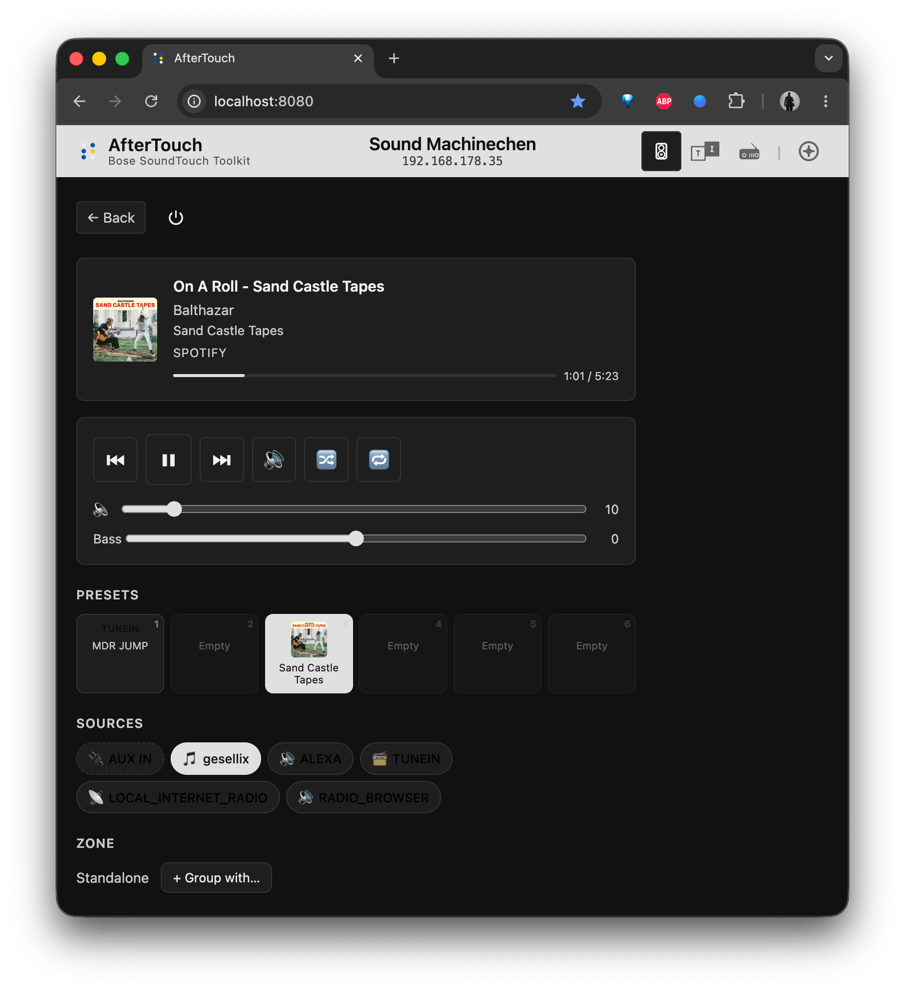
soundtouch-player is an early-stage but functional browser UI bundled with AfterTouch. It gives you:
- TuneIn and RadioBrowser browsing and playback
- Speaker management and device discovery
- Recent tracks panel
- Multi-room zone management
It runs as part of the AfterTouch service — no separate install needed.
Automation with soundtouch-cli
The soundtouch-cli command-line tool covers every speaker control: play, pause,
volume, source selection, preset recall, group management, migration, and more.
It is well-suited for home-automation scripts, cron jobs, and shell one-liners.
Three ways to install
AfterTouch runs on any machine your speakers can reach:
On the speaker itself — install directly on supported SoundTouch hardware via the on-device installer. The speaker hosts its own replacement cloud, with no additional hardware required.
On a local network host — run AfterTouch on any machine on your LAN. A Raspberry Pi Zero 2W handles the load without breaking a sweat, making this path remarkably low-cost and low-power.
On a cloud or VPS host — deploy to a remote server for access outside your home network. AfterTouch handles TLS certificate generation and DNS configuration for this scenario.
All three paths are documented in the Deployment Overview.
Current release
v0.93.1 — released May 24, 2026
Community
AfterTouch would not be where it is without the people who opened issues, tested pre-release builds, reported edge cases, and contributed code. A significant share of the fixes and features shipped in the lead-up to the cloud shutdown were driven by real-world feedback from the community — from migration quirks to stereo-pair specifics to Spotify Connect timing issues. Thank you to everyone who helped.
If you run into something or have an idea, the GitHub issue tracker and Discussions are the right places to start.
What’s next
The soundtouch-player UI will gain richer preset management — browsing, editing, and
reordering presets directly from the browser. Longer term, merging
soundtouch-service and soundtouch-player into a single binary is on the table,
which would simplify deployment to a single process with no extra flags.
This blog will be updated monthly — or whenever something significant ships. Subscribe to the GitHub releases for individual version notes.